
Raise your thermostat a few degrees, set it on a schedule, and keep your filter clean. Those three moves alone can cut your cooling bill noticeably before the end of the month. Every degree you raise the setpoint saves roughly some percent on cooling costs, and a 7–10°F setback for about eight hours a day can trim annual cooling costs.
Start here today:
- Set your thermostat to 78°F when you’re home and 85–88°F when you’re away or sleeping
- Switch the fan mode from “On” to “Auto” so the blower stops running between cooling cycles
- Check your air filter right now and replace it if it’s gray or clogged
- Close south- and west-facing blinds between noon and 4 PM
- Turn off heat-generating appliances (ovens, dryers, dishwashers) during the hottest hours
Savings snapshot: Raising your setpoint several degrees can save a noticeable percentage on cooling. Add a smart thermostat with automated scheduling and you can expect around 8% additional savings annually on top of that.
Table of Contents
- 1. How to save money with AC starting this week
- 2. How much can you realistically save?
- 3. When should you call an HVAC pro?
- 4. Where to find rebates, tax credits, and financing
- Key Takeaways
- The real priority most homeowners get backward
- Xtreme Air Services keeps your AC running at peak efficiency
- Useful sources
- FAQ
1. How to save money with AC starting this week
The fastest wins cost nothing. Here is a prioritized sequence from free behavioral changes to low-cost upgrades.
Behavioral changes (free, immediate)
Raise the thermostat. The U.S. Department of Energy recommends 78°F as the baseline when you’re home. Every degree above that trims your bill. If your household can tolerate 80°F with ceiling fans running, you’re looking at roughly 3% savings per degree compared to 78°F.
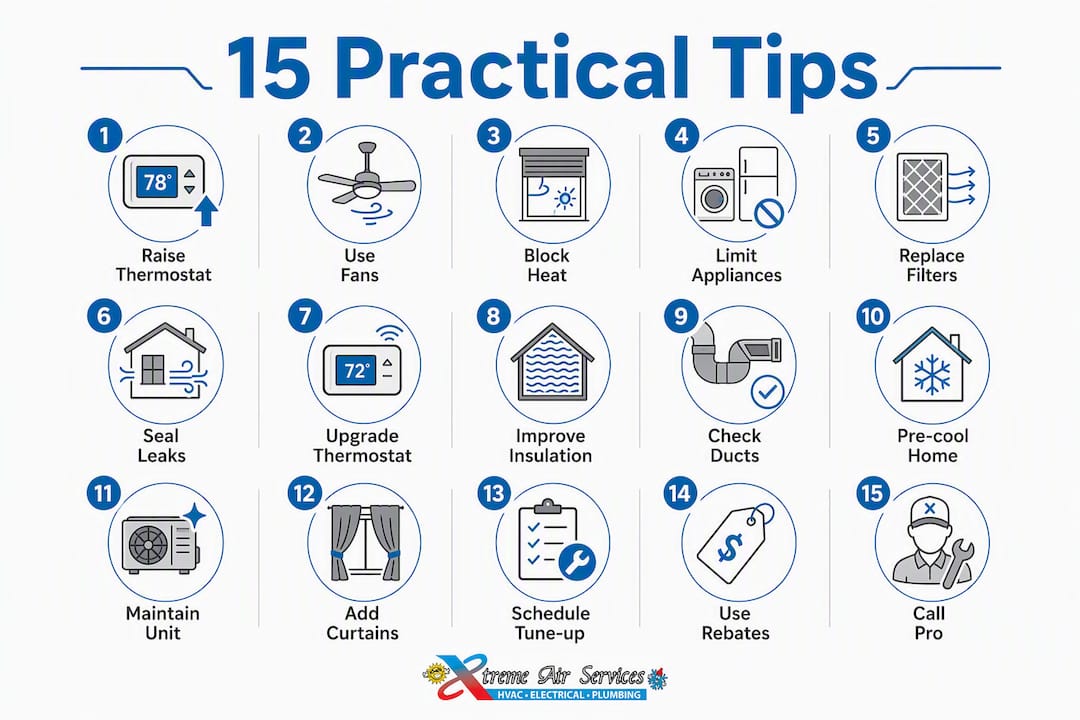
Use ceiling fans strategically. A ceiling fan set to run counterclockwise in summer creates a wind-chill effect that makes 78°F feel like 72°F. Fans cool people, not rooms, so turn them off when you leave.
Block solar heat gain. Direct sunlight through windows can raise indoor temperatures by several degrees. Closing blinds or thermal curtains on south- and west-facing windows during peak afternoon hours is one of the most underrated free actions a homeowner can take.

Limit indoor heat sources. Cooking on the stovetop, running the dishwasher, and using the dryer all dump heat into your living space. Shift those activities to early morning or after 8 PM.
Don’t turn the AC completely off when you leave. HVAC professionals consistently advise setting a higher setback temperature rather than switching the system off entirely, especially in humid climates. A house that’s been off for eight hours takes far longer to cool down, stresses the compressor, and can allow humidity and mold risk to build up.
Maintenance steps you can do yourself
- Replace or clean the air filter. A clogged filter forces the system to work harder. Check it monthly during heavy-use months and at minimum every three months. A $5–$15 filter swap is the single highest-return maintenance task a homeowner can do.
- Check supply and return vents — Make sure furniture, rugs, and curtains aren’t blocking airflow. Closed vents in unused rooms don’t save energy on central systems; they create pressure imbalances.
For a full step-by-step checklist, see home AC unit maintenance steps for homeowners.
Short-term upgrades (under $300 for most homes)
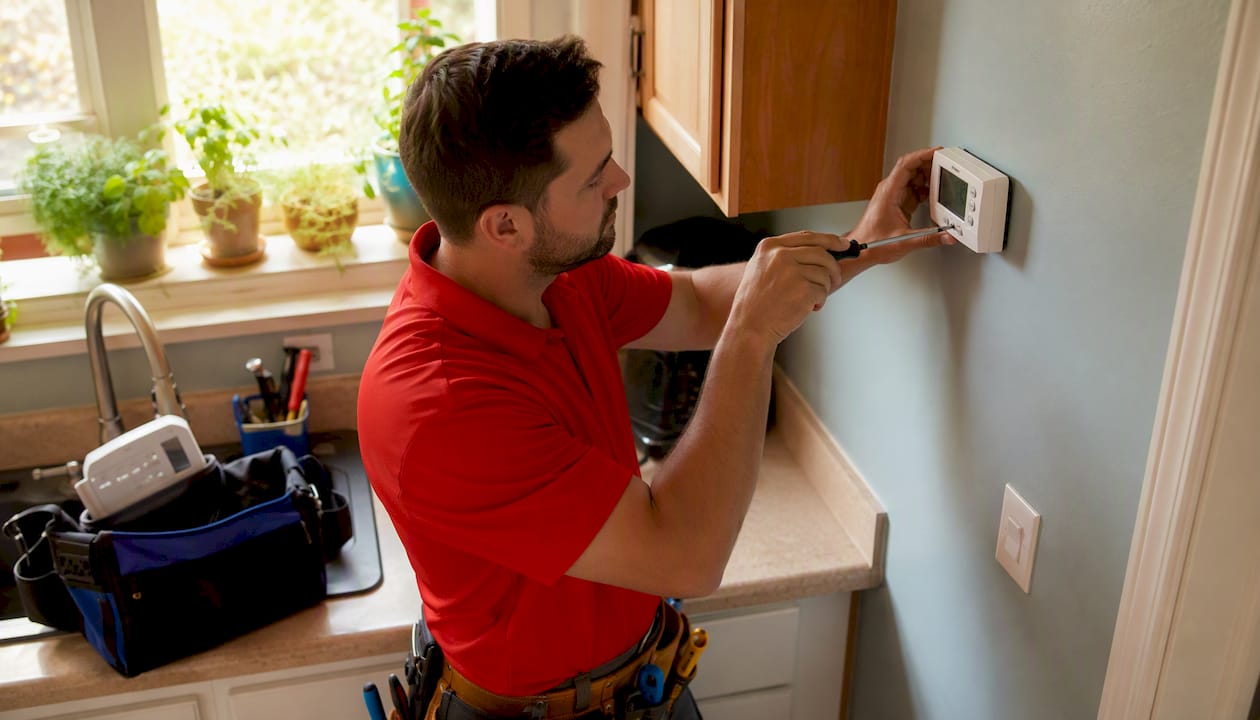
Install a programmable or smart thermostat. This is the single best low-cost upgrade for most homeowners. Smart thermostats with automated setbacks save around 8% on heating and cooling annually. Beyond the savings, they remove the mental burden of remembering to adjust the temperature every time you leave. Learn more about the benefits of using a programmable thermostat.
Add weatherstripping and door sweeps. Gaps around doors and windows let conditioned air escape. A $10–$30 weatherstripping kit and an hour of work can make a measurable difference in a leaky older home.
Upgrade window treatments. Cellular shades and blackout curtains reduce solar heat gain significantly. Reflective window film is another option for south-facing glass.
Check attic insulation. Attics in older homes are often under-insulated. If yours has less than R-30, adding blown-in insulation is a weekend project that pays back over several cooling seasons.
When a bigger upgrade makes sense
A new high-efficiency system (look for a SEER2 rating of 16 or higher) makes financial sense when your current unit is more than 15 years old, requires frequent repairs, or can’t keep up on hot days. Duct sealing by a professional can improve system efficiency by up to 20% and is worth doing before you replace equipment, since a new unit on leaky ducts still underperforms.
| Upgrade | Typical DIY Cost | Typical Pro Cost | Estimated Time |
|---|---|---|---|
| Filter replacement | $5–$15 | N/A | 5 minutes |
| Programmable thermostat | — | — | 30 minutes |
| Weatherstripping | $10–$40 | — | 1–2 hours |
| Attic insulation (top-up) | $200–$600 DIY | — | Half day |
| Duct sealing (pro) | Not recommended DIY | — | Half day |
| Full system replacement | N/A | — | 1–2 days |
Pro Tip: Pre-cool your home by setting the thermostat 2–3°F lower about 30 minutes before you return, rather than cranking it down to 68°F when you walk in. Scheduling pre-cooling during off-peak electricity hours compounds the savings, especially if your utility offers time-of-use rates.
2. How much can you realistically save?
The math is straightforward once you know the baseline rule: roughly 3% savings per degree you raise the thermostat.
Sample calculation for a 2,000 sq ft home in Dallas, TX:
Assume an average monthly cooling bill of $180 during summer months (June–September).
- Raise setpoint from 72°F to 78°F (6°F): 6 × 3% = 18% savings = ~$32/month, ~$130/season
- Add smart thermostat with 8-hour setback at 85°F when away: additional ~8% annually = ~$14/month
- Seal ducts (up to 20% efficiency gain): up to $36/month during peak cooling
Combined, a homeowner who makes all three changes could realistically cut their summer cooling bill by 30–40% compared to an unmanaged baseline. That’s $50–$70 per month during the four hottest months, or $200–$280 per season, without replacing any equipment.
Key figure: A 7–10°F setback for eight hours a day can save as much as 10% annually on cooling and heating costs, according to DOE guidance.
Humidity’s hidden role. Better moisture management lets you hold a higher thermostat setpoint without feeling uncomfortable. A home at 78°F and 45% relative humidity feels cooler than a home at 75°F and 65% humidity. If your home runs humid, a whole-home dehumidifier or your AC’s “dry” mode can let you raise the setpoint by 2–3°F, compounding the savings above.
| Measure | Typical Savings Range |
|---|---|
| Thermostat setback for 7–10°F for about 8 hours daily can save up to 10% annually | |
| Smart thermostat with scheduling can yield around 8% annual savings | |
| Duct sealing/insulation can improve system efficiency by up to 20% | |
| Filter replacement improves airflow efficiency noticeably | |
| Ceiling fans plus raised setpoint can achieve roughly 3% savings per degree raised |
Caveats that matter: These ranges assume average U.S. conditions. A poorly insulated 1960s ranch in Phoenix will see different results than a well-sealed 2010 build in Charlotte. Climate zone, home envelope quality, and how many hours the system runs daily all shift the numbers. Use these figures as directional estimates, not guarantees.
3. When should you call an HVAC pro?
Small, consistent behavioral changes plus targeted improvements often outperform one-time expensive equipment fixes. But some problems are beyond a homeowner’s reach, and ignoring them costs more in the long run.
DIY is fine for:
- Replacing air filters
- Clearing debris from the outdoor condenser unit
- Programming a thermostat
- Sealing small gaps around doors and windows with weatherstripping or caulk
- Checking and unblocking supply/return vents
Call a pro when you notice:
- Unusual noises (grinding, squealing, banging) from the indoor or outdoor unit
- Ice forming on the refrigerant lines or indoor coil
- The system short-cycling (turning on and off every few minutes)
- Warm air from supply vents after basic checks
- A sudden spike in your energy bill with no change in usage habits
- Musty odors that suggest mold in the ducts or coil
- Suspected refrigerant leak (hissing sound, oily residue near lines)
Pro Tip: Never attempt to add refrigerant yourself. Refrigerant handling requires EPA Section 608 certification. An unlicensed top-up can void your warranty and create a safety hazard.
Typical pro cost ranges
| Service | Typical Cost Range |
|---|---|
| Annual tune-up / maintenance visit | $75–$200 |
Questions to ask before you hire
- Are you licensed and insured in Texas, and can you pull permits if needed?
- Do you offer a written estimate before starting work?
- Can you help identify rebates or tax credits for qualifying equipment?
If you’re weighing whether to repair or replace, this repair vs. replacement guide walks through the decision clearly.
4. Where to find rebates, tax credits, and financing
Efficiency upgrades cost money upfront. The good news is that federal, state, and utility programs can offset a significant portion of that cost.
Main incentive sources
- Federal tax credits: The Inflation Reduction Act extended and expanded residential energy efficiency credits. Qualifying high-efficiency HVAC equipment (heat pumps, central AC meeting specific SEER2 thresholds) may qualify for a tax credit of up to 30% of the installed cost, capped at $600 for central AC and up to $2,000 for heat pumps, per year. Confirm current limits at energystar.gov or with a tax professional.
- Utility rebates: Most major Texas utilities (Oncor, AEP Texas, CenterPoint Energy) offer rebates for ENERGY STAR-certified equipment and smart thermostats. Check your utility’s website directly.
- ENERGY STAR rebate finder: The ENERGY STAR rebate search tool lets you enter your zip code and equipment type to find current offers.
- DSIRE: The Database of State Incentives for Renewables & Efficiency (DSIRE) is the most comprehensive national database of state and local programs.
- State programs: Texas has historically offered limited state-level HVAC rebates, but local utility programs often fill that gap.
Financing options
- PACE financing: — Property Assessed Clean Energy (PACE) financing is available in some Texas municipalities and lets you repay the cost through your property tax bill.
Rebate checklist
- Confirm the equipment’s ENERGY STAR certification before purchase
- Get pre-approval from your utility if required (some programs require pre-approval before installation)
- Keep all receipts, model numbers, and SEER2 ratings
- Ask your contractor to provide a signed invoice with equipment specs
- File federal tax credits using IRS Form 5695
Pro Tip: Some utility rebates are first-come, first-served and run out mid-season. Check availability before scheduling installation, not after.
Key Takeaways
Combining thermostat setbacks, regular maintenance, and targeted sealing delivers the fastest and most reliable reductions in AC energy use for most homeowners.
| Point | Details |
|---|---|
| Thermostat setback saves fast | Every degree raised saves roughly 3%; a 7–10°F setback for 8 hours daily can cut annual costs by up to 10%. |
| Filter changes are the highest-return DIY task | Replace monthly during heavy use or at minimum every 3 months to prevent airflow restriction. |
| Duct sealing has major upside | Professional duct sealing can improve system efficiency by up to 20%, per ENERGY STAR. |
| Smart thermostats automate the savings | Automated scheduling saves around 8% annually and removes the guesswork of manual adjustments. |
| Xtreme Air Services covers the full picture | From tune-ups and duct diagnostics to thermostat installation and rebate assistance in the Dallas, TX area. |
The real priority most homeowners get backward
Most homeowners reach for the thermostat first and the phone second. That’s actually the right instinct, but the order of what comes after is where most people go wrong.
The typical mistake is skipping straight to “should I replace my AC?” when the system is struggling. Nine times out of ten, a system that’s underperforming has a dirty filter, a blocked condenser, or leaky ducts, not a failing compressor. Replacing a unit that just needed a $15 filter and a duct inspection is an expensive lesson.
The smarter sequence is behavior first, maintenance second, targeted upgrades third, and equipment replacement only when the math genuinely supports it. A 15-year-old unit running on clean ducts with a smart thermostat will outperform a brand-new unit on a leaky duct system every time.
One thing that gets overlooked consistently: humidity. In humid climates like Dallas, the thermostat number is almost secondary to how the air feels. A home at 78°F and 45% humidity is comfortable. The same home at 75°F and 70% humidity is miserable, and most people respond by dropping the setpoint further, which drives the bill up without solving the actual problem. A dehumidifier or a properly functioning AC coil (not one caked in grime) addresses the root cause.
The other underrated move is the fan mode switch. Leaving the fan on “On” instead of “Auto” forces the blower to run continuously, which re-evaporates moisture off the coil back into the house. That raises perceived temperature and leads to lower thermostat settings, which drives the bill higher. One setting change, zero cost.
Xtreme Air Services keeps your AC running at peak efficiency
Knowing what to do and having the right team to do it are two different things. Xtreme Air Services serves homeowners across the Dallas, TX area with HVAC maintenance plans, system diagnostics, duct sealing, and smart thermostat installation — all the services this article recommends, handled by licensed, insured technicians who know the local climate.
A seasonal tune-up from Xtreme Air Services covers filter inspection, coil cleaning, refrigerant level check, electrical connections, and airflow testing. The team can also identify rebate-eligible equipment and help with the documentation your utility or tax preparer needs. If your system is aging and you’re weighing options, Xtreme Air Services provides honest repair-vs.-replacement assessments without the upsell pressure.
Schedule your HVAC maintenance plan today and get your system ready before peak cooling season hits.
Useful sources
The following sources informed this article and offer further reading for homeowners who want to go deeper:
- Heat & Cool Efficiently | ENERGY STAR — Covers duct sealing, filter maintenance, and equipment efficiency ratings
- Which AC settings can actually lower your electric bill this summer? | CBS News — Per-degree savings rule of thumb, fan mode guidance, and humidity management
- Experts say air conditioning strategy can save money when it’s hot out | AP News — DOE setback guidance and HVAC pro recommendations on setback vs. off
- How to Save Money on Air Conditioning and Lower Your Energy Bill | NBC News — Expert perspective on behavior vs. equipment upgrades
- Keep your home cool for less | Tom’s Guide — Pre-cooling strategy and time-of-use scheduling
- How To Save Money on Heating and Cooling Your Home | Consumer Advice (FTC) — Practical homeowner guidance on HVAC efficiency and EnergyGuide labels
- ENERGY STAR Programmable Thermostats — Rebate finder and qualifying product listings
- Home AC unit maintenance steps for homeowners | Xtreme Air Services — Step-by-step DIY maintenance checklist
- Benefits of using a programmable thermostat | Xtreme Air Services — How scheduling and automation reduce energy use
FAQ
What thermostat setting saves the most money on AC?
The U.S. Department of Energy recommends 78°F when you’re home and 85–88°F when you’re away. Every degree above your current setpoint saves roughly 3% on cooling costs.
What is the cheapest way to run your AC?
Set a scheduled setback of 7–10°F for the hours you’re away or asleep, keep the fan on “Auto,” replace filters regularly, and use ceiling fans to allow a higher setpoint. These combined steps cost little to nothing and produce the fastest bill reductions.
Does keeping the AC at 72°F save money?
No. Holding 72°F costs more than 78°F. The difference of 6°F translates to roughly 18% higher cooling costs, based on the 3%-per-degree rule. If 72°F is your current setpoint, raising it to 78°F with ceiling fans running is one of the most impactful changes you can make.
How do I make my AC use less electricity?
Combine a higher thermostat setpoint with scheduled setbacks, a clean filter, sealed ducts, and blocked solar heat gain during peak afternoon hours. Duct sealing alone can improve system efficiency by up to 20%, and a smart thermostat automates the setback schedule so you don’t have to think about it.
When should I call a pro instead of handling AC issues myself?
Call a licensed technician for refrigerant issues, frozen coils, short cycling, unusual noises, or any situation where basic checks haven’t resolved poor cooling. Xtreme Air Services offers diagnostics and maintenance plans for homeowners in the Dallas, TX area.