A blank thermostat screen almost always means the unit lost power, not that it broke. Start with the two-minute checks: swap in fresh batteries and confirm the HVAC breaker hasn’t tripped. If both check out and the screen stays dark, the problem is usually deeper: a loose wire or a missing C-wire feeding the control board. At that point, stop guessing and call a licensed technician before touching anything behind the wall plate.
TL;DR:
- Most blank thermostat screens are caused by power loss from dead batteries, tripped breakers, or an off furnace switch, not hardware failure.
- Checking and replacing batteries, resetting breakers, and power-cycling the system resolves most issues within minutes.
- Smart thermostats often require a dedicated C-wire, and a missing or loose C-wire frequently causes intermittent or blank displays.
- Error codes like Nest’s “No power” or flickering screens indicate wiring or power supply problems that need specific troubleshooting steps.
- If the display remains blank after basic checks, wiring issues or control board failures are likely, requiring professional diagnosis.
Table of Contents
- Five Quick Checks Before You Do Anything Else
- Step-By-Step Thermostat Troubleshooting, From Easiest to Advanced
- Why Smart Thermostats Need a C-Wire (And What Happens Without One)
- What Nest, Trane, and Amazon Thermostats Tell You When They Fail
- When a Blank Screen Means Call a Professional, Not a Fix-It Video
- Simple Habits That Keep Your Thermostat From Going Dark Again
- What a Thermostat Diagnostic Visit With Xtreme Air Services Looks Like
- Where to Find More Thermostat Troubleshooting Help
- Our Take: Most Blank Screens Are Simpler Than They Look, Until They’re Not
- Sources
- FAQ
Five Quick Checks Before You Do Anything Else
Most blank-screen calls get solved in the time it takes to make coffee. Work through these five checks in order, and don’t skip ahead just because one seems unlikely.
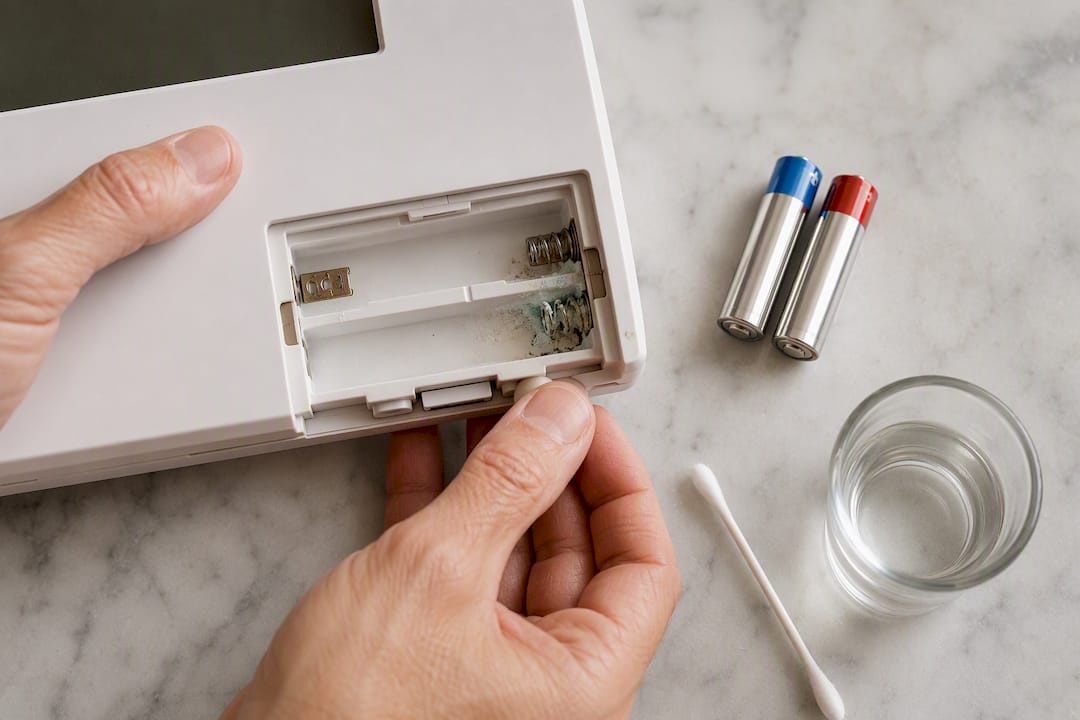
- Replace the batteries. Even thermostats that seem hardwired often run backup power off AA or AAA alkaline batteries. Pop the unit off its base, swap both batteries, and wipe the contacts with a dry cloth. Corrosion on the contacts is a bigger culprit than dead batteries themselves.
- Tap or touch the display. Some smart thermostats intentionally dim to save power when idle, and a light touch or a walk past a motion sensor wakes them back up. If yours has adjustable brightness in a companion app, check that setting before assuming the hardware is dead.
- Check the breaker panel and the system switch. Look for a tripped breaker labeled “furnace,” “air handler,” or “HVAC,” and flip it fully off, then on. Many furnaces also have a dedicated switch near the unit that looks like a light switch. Flip it back on if it’s off.
- Power-cycle the thermostat and the system. Turn off power at the breaker for 20 to 30 seconds, then restore it. This clears minor glitches the same way restarting a router does.
- Look, don’t touch, at the wiring. Pull the thermostat gently off its base and glance at the wire terminals for anything obviously loose or disconnected. Do not pull wires free or press on bare terminals.
Pro Tip: Keep a spare set of AA batteries in your utility drawer next to your furnace filters. A dead thermostat battery at 6 a.m. in January is a bad way to start the day.
Step-By-Step Thermostat Troubleshooting, From Easiest to Advanced
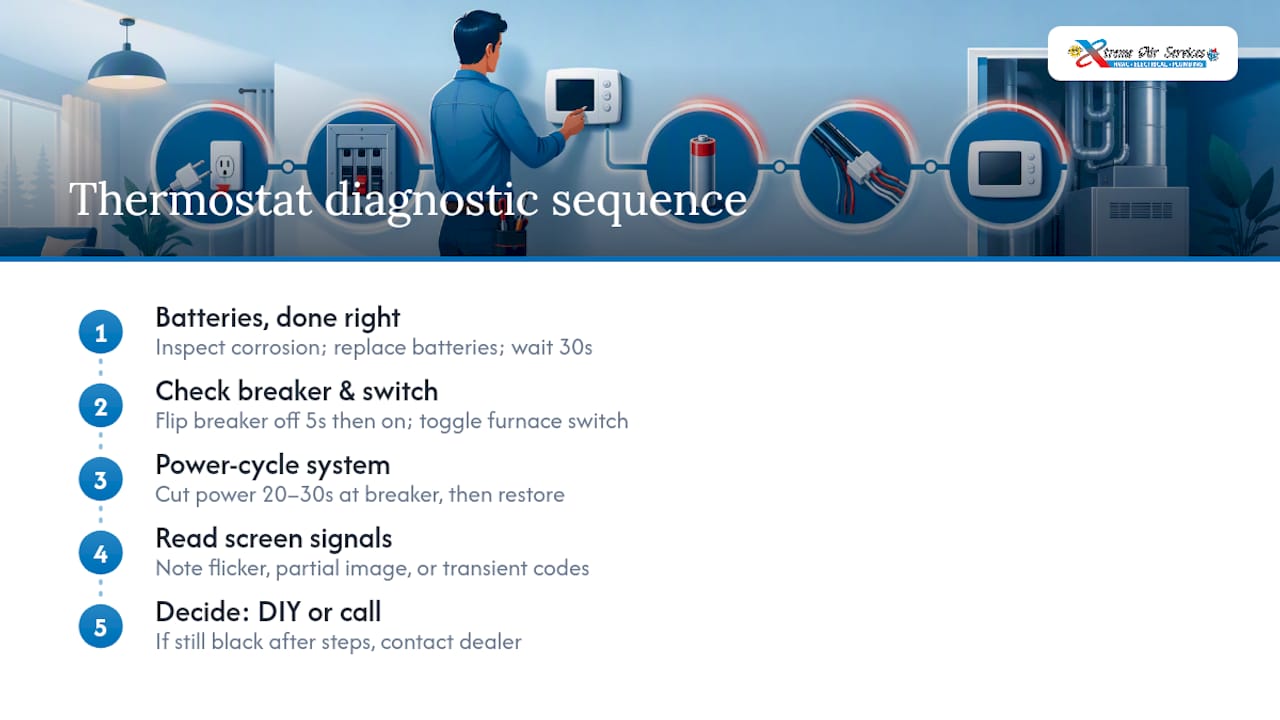
Once the five-minute checks are done, it’s worth working through the full diagnostic sequence in order. Each step either fixes the problem or rules something out, which matters because guessing randomly can waste an entire afternoon.
Step 1: Batteries, done right.
Open the battery compartment (usually behind the faceplate, sometimes inside a small door on the front). Remove both batteries and inspect the springs for white or greenish corrosion, a sign of a slow leak that’s been draining power for weeks. If you see corrosion, a cotton swab dipped in vinegar and a thorough dry-out will usually clear it. Insert fresh batteries matched to the polarity markings, snap the thermostat back onto its base, and wait 30 seconds for the display to boot.
Step 2: Find the right breaker and switch.
HVAC systems typically draw power through a dedicated breaker in your main panel and, separately, a toggle switch mounted near the furnace or air handler that looks identical to a wall light switch. A blank or unresponsive thermostat screen most often indicates loss of electrical power, and a tripped breaker or a switch someone bumped while doing laundry is one of the most common reasons. Flip the breaker fully to “off,” count to five, then flip it back to “on.” Do the same with the furnace switch.
Step 3: Power-cycle everything together.
This is the step Trane’s own support documentation recommends before anything more involved: cut power at the breaker, wait 20 to 30 seconds, then restore it. That pause matters. Capacitors and control boards need a moment to fully discharge, and restoring power too fast sometimes skips the reset entirely.
Step 4: Read what the screen is actually telling you (if it’s telling you anything).
If the display flickers on briefly, shows a partial image, or displays a code before going dark again, that’s useful information, not a dead end. A flickering backlight that fades suggests a weak power supply rather than total failure. A code that appears and disappears often points to the system trying and failing to establish a stable connection to the furnace board.
Step 5: Decide whether to keep going or call for help.
If you’ve replaced batteries, checked the breaker and switch, and power-cycled the system, and the screen is still completely black, the odds shift toward wiring or a control-board issue rather than something a homeowner can safely fix. Trane’s guidance is direct on this point: if the screen stays blank after a power cycle and breaker check, it’s time to contact a dealer rather than keep experimenting.
One detail homeowners consistently miss: a thermostat that worked fine for years and then suddenly goes blank right after a furnace filter change, a storm, or an electrical panel upgrade is rarely coincidental. Something in that recent event likely disturbed a connection.
Why Smart Thermostats Need a C-Wire (And What Happens Without One)
Traditional thermostats often ran fine on batteries alone because they only needed to open and close a low-voltage circuit. Smart thermostats are different: their touchscreens, Wi-Fi radios, and always-on processors need constant power, which is where the C-wire, short for “common,” comes in.
The R-wire delivers 24-volt power from the transformer, and the C-wire completes that circuit so power flows continuously rather than only when the system calls for heat or cooling. Without a C-wire, a smart thermostat tries to steal tiny amounts of power from the signal wires themselves, a workaround called “power stealing” that often causes exactly the symptoms homeowners report: flickering, dimming, or a screen that goes fully blank at random.
Here’s what to look for at the wall plate, without disturbing anything:
- Check whether a wire is connected to the terminal labeled “C.” If that terminal is empty, that’s likely your answer.
- Note the wire colors at each terminal (commonly blue or black for C, red for R), since a technician will ask.
- Look for wires that appear pushed in loosely or backed out slightly from the terminal screws.
- Photograph the wiring before assuming anything, so a technician has a reference even if the thermostat gets bumped.
A missing or loose C-wire is one of the most frequent causes of blank or intermittently blank smart displays, and manufacturers generally recommend one of two fixes: install a power extender kit that creates a virtual common wire, or run an actual dedicated C-wire from the furnace board. The extender kit is a reasonable stopgap, but it’s still routing power through a workaround, and some furnace boards don’t support it well.
Pro Tip: If your thermostat runs on batteries alone and never had a C-wire problem before, don’t assume this section applies to you. C-wire issues are almost exclusively a smart-thermostat problem, not a standard mechanical dial thermostat problem.
Running a proper C-wire usually means a technician either finds an existing unused wire in the wall (common in newer construction) or fishes a new conductor from the thermostat location back to the furnace. Expect the visit to include a check of your furnace’s low-voltage transformer output, since a weak transformer can mimic a wiring problem. If you’re already leaning toward a smart thermostat, a smart thermostat installation that includes a compatibility and wiring check up front avoids this entire headache later.
What Nest, Trane, and Amazon Thermostats Tell You When They Fail
Manufacturers build in specific signals before a screen goes fully dark, and knowing what your brand shows can save a diagnostic call entirely.
- Nest thermostats display a “No power” alert along with help codes like E298, E448, or M20 before the screen goes completely blank. These codes point specifically to wiring or power-connection problems rather than a software glitch, so if you catch one of these codes before the screen dies, note it down for the technician.
- Trane and Honeywell units generally skip fancy error codes and go straight to blank, but official troubleshooting steps ask you to power-cycle first, then check the breaker, then check the furnace power switch and furnace access door, since a loose furnace door sometimes trips a safety interlock switch that cuts power entirely.
- Amazon Smart Thermostat units are known for a subtler issue: the display dims aggressively to save power, which can look like a total failure when it’s actually a brightness setting buried in the Alexa app. Amazon’s own support page also flags wiring and C-wire connections as the next step if adjusting brightness doesn’t fix it.
Whatever brand you own, the manufacturer’s own troubleshooting page is worth five minutes before you call anyone, since model-specific quirks like these save real diagnostic time.
When a Blank Screen Means Call a Professional, Not a Fix-It Video
Some symptoms are worth troubleshooting yourself. Others are worth stopping immediately and picking up the phone.
- Any burning smell near the furnace, thermostat, or electrical panel.
- Visible sparking, scorch marks, or a breaker that trips again the instant you reset it.
- A blown fuse on the furnace control board itself, not just the household breaker.
- Wires that look melted, frayed, or chewed (a more common problem than people expect in homes with attics or crawl spaces).
Avoid opening a live electrical panel yourself, and never probe thermostat wiring while the system still has power running to it. These aren’t overcautious warnings. Furnace control boards carry enough voltage to cause a real shock, and a wiring mistake can fry a $200 to $400 circuit board in seconds.
Pro Tip: Before the technician arrives, write down your thermostat’s model number, what you’ve already tried, and whether any lights are on near the furnace or air handler. That single note can cut a diagnostic visit from an hour to fifteen minutes.
When you call, mention the specific steps already taken. A technician who knows you’ve already replaced batteries and checked the breaker can skip straight to wiring and control-board diagnostics instead of repeating the basics.
Simple Habits That Keep Your Thermostat From Going Dark Again
A little routine maintenance prevents most repeat blank-screen calls.
- Replace thermostat batteries once a year, ideally when you swap furnace filters, so the two become one easy habit.
- Ask your HVAC technician to check thermostat wiring and C-wire availability during seasonal tune-ups, especially before installing a smart upgrade.
- Keep the thermostat out of direct sunlight and away from heat vents, both of which cause false temperature readings and, over time, stress the internal electronics.
- Dust the thermostat face and vents gently every few months. Built-up dust can interfere with touch sensors on newer models.
Energy treats these devices as part of a home’s regular energy-saving maintenance routine, not a set-and-forget gadget, which is exactly the mindset that prevents the 6 a.m. blank-screen scramble in the first place.
What a Thermostat Diagnostic Visit With Xtreme Air Services Looks Like
If the checks above haven’t brought your screen back, a professional visit typically starts with the basics before moving to anything invasive. A technician confirms voltage at the thermostat base, tests the furnace transformer output, and checks whether a C-wire exists or needs to be added.
Xtreme Air Services handles thermostat installation throughout the Dallas area, including diagnosing wiring issues behind an existing blank-screen unit rather than just swapping in a new one. A range of smart thermostats, including the Honeywell T6 Pro Smart Thermostat, are offered for homeowners who decide a dead screen is the right moment to upgrade rather than repair. For furnace-side power issues, technicians familiar with major equipment brands, including Trane XR13 air conditioners, can usually trace whether the problem sits at the thermostat, the furnace board, or somewhere in between.
| What to expect | Why it matters |
|---|---|
| Voltage check at thermostat base | Confirms whether power loss is upstream or at the unit itself |
| Furnace transformer test | Rules out a weak or failing 24V transformer as the root cause |
| C-wire and compatibility check | Determines if a smart thermostat upgrade needs new wiring |
| Furnace board inspection | Identifies blown fuses or board damage not visible from the thermostat |
A blank screen you can’t fix yourself is often a fifteen-minute repair for someone who does this daily, and folding that check into a broader HVAC maintenance plan means it gets caught before it strands you without heat or air conditioning.
Where to Find More Thermostat Troubleshooting Help
For model-specific guidance beyond what’s covered here, Trane’s thermostat troubleshooting page and Google Nest’s “No power” support article both walk through brand-specific fixes. Energy.gov’s overview of programmable thermostats covers broader efficiency context worth knowing before any upgrade.
Our Take: Most Blank Screens Are Simpler Than They Look, Until They’re Not
The conventional advice on thermostat troubleshooting tends to bury the batteries-and-breaker check under paragraphs of caveats about wiring diagrams and voltage testing. That gets the order backwards. Most blank screens die from something boring: a dead AA battery, a bumped switch near the furnace, a breaker that tripped during a storm nobody noticed. Homeowners who jump straight to worrying about control boards often skip the two-minute fix sitting right in front of them.
Where the conventional advice actually falls short is the C-wire issue. It gets treated as a rare edge case, but it’s one of the more common reasons a smart thermostat goes dark intermittently rather than staying dark. If your screen flickers, dims, or resets sporadically rather than staying permanently blank, put your money on wiring before you put it on a replacement thermostat.
Prioritize the cheap checks first, always. But once you’ve ruled out batteries and breakers, stop guessing. A furnace control board is not the place to learn wiring on the fly, and a component like a TXV failing elsewhere in the system can produce symptoms that mimic a thermostat problem entirely. Know the difference between saving twenty dollars and risking a four-hundred-dollar board.
— Xtreme
Sources
- Common Thermostat Issues and How to Troubleshoot — Carrier
- My thermostat is blank/has a white or black screen — Trane Home
- Troubleshoot a ‘No power’ alert on a Nest thermostat — Google Home and Nest Help
- The Amazon Smart Thermostat Display Is Blank – Amazon Customer Service
FAQ
Why Is My Thermostat Not Showing a Display?
A blank display almost always means the unit lost power, most commonly from dead batteries, a tripped breaker, or the furnace power switch being off. Check those three things in order before assuming a bigger problem.
Why Is the Screen Off on My Thermostat?
The screen may be genuinely powerless, or on smart thermostats, it may simply have dimmed to save energy during idle periods. Touch the screen or check the brightness setting in your thermostat’s app before troubleshooting further.
What Would Make a Thermostat Go Blank?
The most common causes are dead batteries, a tripped circuit breaker, a furnace power switch left off, or, on smart thermostats, a missing or loose C-wire. If basic checks don’t restore the display, wiring or control-board issues are the likely next suspect.
Why Is My Honeywell Thermostat Screen Blank?
Honeywell units typically go blank from the same power interruptions as other brands: dead batteries, a tripped breaker, or the furnace switch being off. Power-cycling the system for 20 to 30 seconds after checking those items often restores the display.